Riggott IMS is a cloud-based smart app that allows your company to handle, control and automate all your business information. This uniquely designed system will strengthen; help you bring onboard new processes.
This help page is currently being populated, so at the time of visiting may not include all sections of the Integral Management System.
What the Integrated Management System (IMS) delivers
All processes from initial customer enquiry to planning, work on-site, invoicing and statistics are handled in the IMS.
All processes are connected to reduce risk, reduce forced errors, and better understand the business operations and job costings.
Process Flow
This simple flow diagram shows the basics and connectivity.
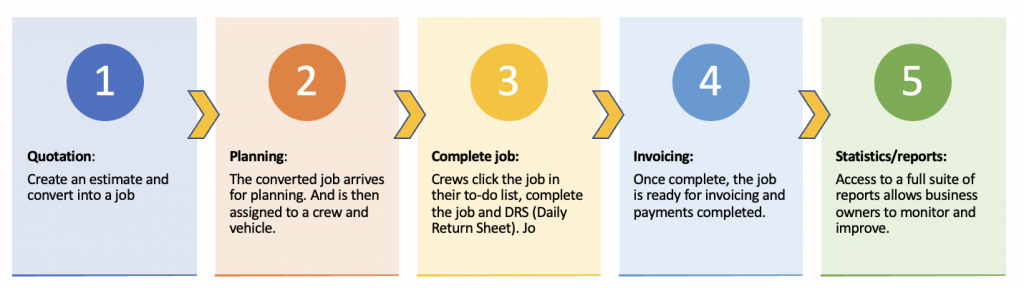
Departments
To manage the process flow, all departments need to work as one.

Detailed process
Expanding on the basic flow diagram above, the below image shows a wider amalgamated process.

How to use the IMS.
Your Dashboard
You can access your dashboard through your internet browser on any internet-abled device.
The below image shows the dashboard, including the main menus across the top and sub-menus below.
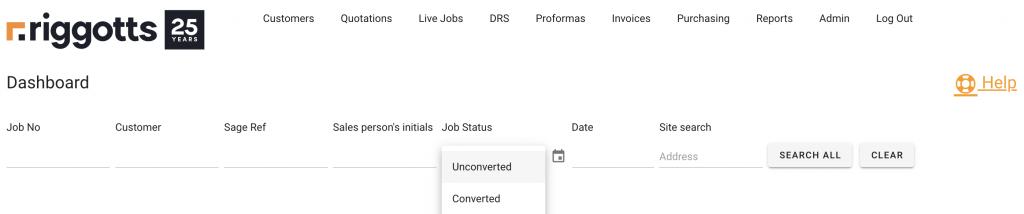
As you click on any menu item (Top Row), further selections (Sub Menus) will appear relevant to the click menu item.
The main menus and sub-menus are (including links to their individual help pages:
- Customers
- Add New Customer
- Search Customers
- Quotations
- Add new quote
- Expired Quotes
- My Open Quotes
- All Open Quotes
- Search Quotes
- Live Jobs
- Jobs Not Planned
- Planned Jobs
- Complete Not Approved
- Awaiting Accounts
- DRS (Daily Return Sheets)
- Search DRS
- Proformas
- To Be Raised
- Raised
- Invoices
- Draft invoices
- Applications
- Add invoice
- Search Invoices
- Credit Notes
- Consolidated Payments
- Purchases
- Reports
- Weekly Pay
- Jobs
- Admin
- BOQs
- Colours
- Materials
- Surface Types
- Work Types
- Personnel
- Costs
- Fuel
- Permissions
- Users
- BOQ Bonuses
- Business Types
- Adding Payments
- Customer finance statements
Tools
From your dashboard, you have search tools that will search the whole of the IMS to return the required result.
Enter the job number, customer, Sage Ref, Salesperson, Job Status, dates or site and click search all, and the IMS will return the relevant:
- Quotations
- Jobs
- Invoices or applications
- DRSs
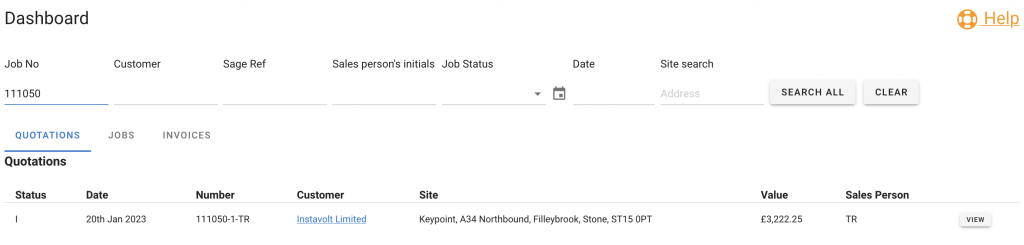
Below is the result of a job search fro job number 111050. The IMS has found the job and displayed many job details with links to view the customer or the ‘View’ button to access all the job information.
Tabs also provide quick access to the Job Overview and the Job Invoice.